

Context & Problem
Product landscape
IMR is where engineering teams manage technical failures. A team owns a set of services, the infrastructure that keeps their product running. When a service breaks, an incident gets created, either manually or through integrations with monitoring tools like Grafana or Slack. The right team gets alerted and works the incident until it's resolved. That's the internal loop. Engineers fixing problems, talking to engineers.
But customers notice outages too. They need to know what's happening, what's affected, and when it'll be fixed. That's what a status page does. It's the public-facing page a company maintains to communicate service health during an outage. This project brought those two worlds into one place.


Xurrent IMR (internal focus)
An incident management and response platform used by engineering and operations teams to detect, communicate, manage, and resolve system failures.

StatusCast (external focus)
A customer-facing product used to communicate service availability and outages to external stakeholders to maintain transparency and trust.
Legacy gap
After Xurrent acquired StatusCast and IMR, leadership prioritised integrating status pages into IMR. Before I could design anything, I needed to understand what the gap between the two tools actually felt like in practice.
I walked through the existing workflow: an engineer receives an alert in IMR, triages and resolves internally, then switches to StatusCast to manually post a customer-facing update. During a live incident, that context switch is expensive. I identified three specific problems with this workflow:
Operational friction
Engineers had to manually copy updates from internal response logs into the public status page while under high pressure.
Risk of inconsistency
Manual data entry increased the chance of sharing conflicting information, which weakened customer trust.
Competitive pressure
PagerDuty and incident.io, our two closest competitors, both offered native status page capabilities within their incident platforms. Customers evaluating IMR were comparing us against products where incident response and customer communication lived in the same tool.
Strategic Foundation
Constraints
Technical debt
This was a post-acquisition integration of an existing product, not a greenfield build; I had to align with existing architectural patterns.
Churn risk
The integration needed to align with StatusCast’s existing architecture to ensure a low-friction migration path for current customers.
Phased delivery
We prioritized manual reliability to ensure a zero-failure migration for legacy customers. The architecture had to be useful today while supporting future expansion.
Design objective
The goal was not simply to embed status pages into IMR, but to unify two previously separate systems into a single, coherent incident lifecycle. Within a two-month release window, the focus was on establishing a foundation that balanced immediate usability with long-term architectural convergence. To achieve this, I focused on three objectives:
Unify internal and external workflows
Create a single operational surface where incident response and customer communication coexist, eliminating the need for parallel tooling during high-pressure situations.
Enable migration without disruption
Deliver a lightweight setup model that preserved StatusCast compatibility, reducing churn risk while enabling gradual lifecycle unification.
Introduce a customer facing abstraction layer
Design a Business Service hierarchy that decouples internal system complexity from external communication, allowing accurate impact reporting without exposing infrastructure details.

IMR Status Pages for desktop and mobile.
Key Product Decisions
1. Introducing 'business services' as an abstraction layer
Incident management platforms like PagerDuty separate internal technical services from customer facing business services. StatusCast had a similar concept but it lived in a completely separate product. IMR had no abstraction layer at all, internal service names would have been exposed directly to customers. I brought the business services pattern into IMR as part of the integration, giving teams a way to translate internal infrastructure into language customers understand.
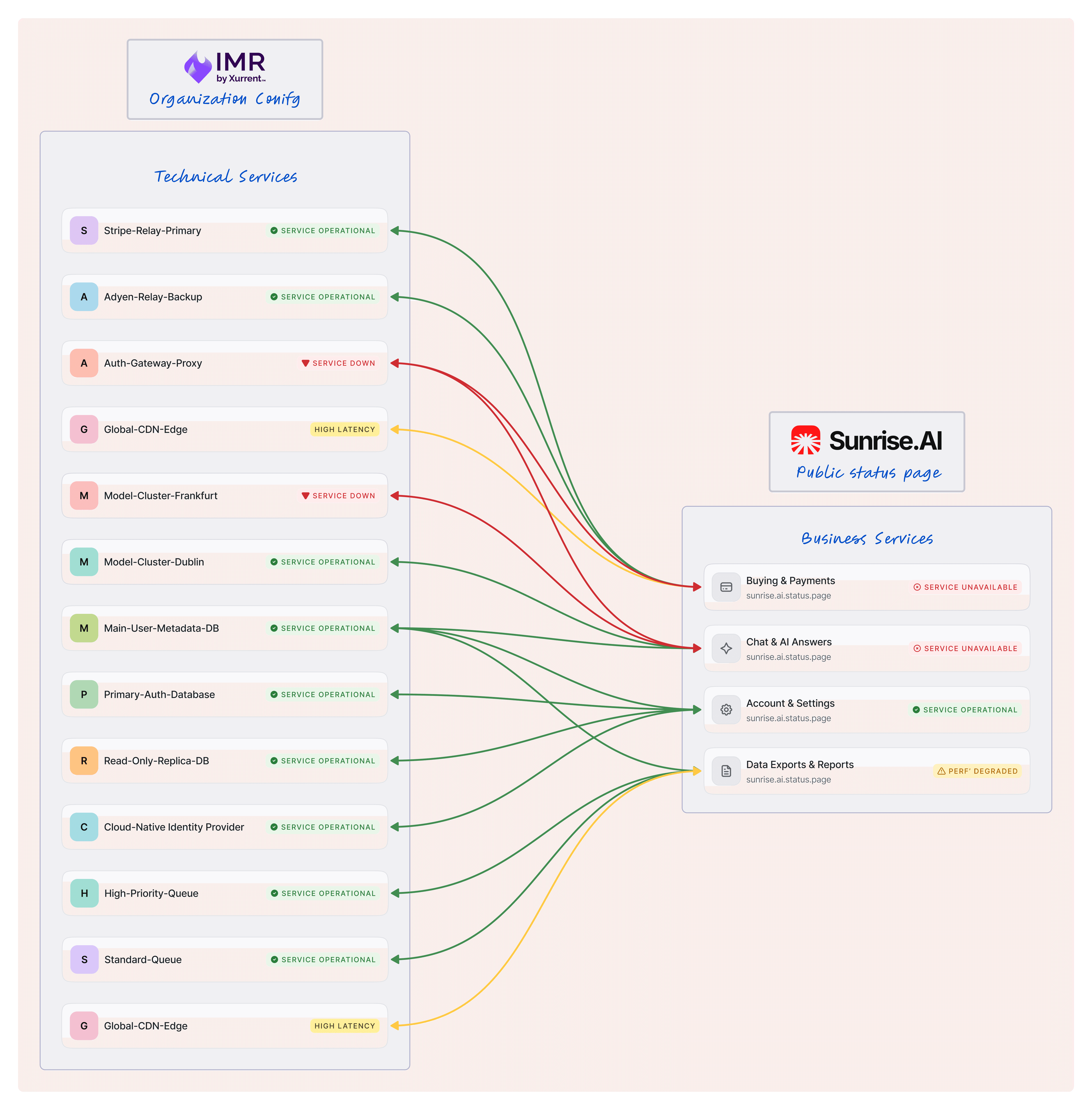
2. Nested hierarchy over a flat list
PagerDuty and incident.io both use a flat list of business services. I considered that approach but chose a nested hierarchy instead. The decision was partly strategic: StatusCast already used nested business services, and our existing customers had built their status pages around that structure. Flattening it would have forced them to rebuild their service architecture during migration, increasing churn risk. But the nested model also turned out to be the stronger design choice. It lets admins map any level of the hierarchy, parent or child, to an internal technical service. A flat list would have required a 1:1 relationship between business services and technical services. The nested model gives teams flexibility to represent complex service relationships without exposing that complexity to customers.

In V1, the nested hierarchy is the visible foundation, admins build their service structure and use it to organise their status page. The technical service mapping, mapped service indicators, and automated incident flows ship in V2. The architecture supports all of it, but we scoped V1 to get the structure right before layering automation on top.
3. Positioning status pages as an account-level capability
The initial discussion considered nesting status pages within individual teams. I pushed for account level instead. In IMR, teams and services follow a strict hierarchy. Nesting status pages inside that hierarchy would have forced business services to inherit those same boundaries, making cross-team service mapping complex and blocking our planned automation path. Account-level placement keeps status pages independent of team structure, so any team's services can feed into a single status page. That flexibility was a prerequisite for the automated incident flow we planned for V2.

4. Prioritizing visibility over automation in V1
StatusCast already had an automation feature called Beacons, a rule builder that let third-party tools trigger status page incidents automatically. For IMR status pages, the automation opportunity was larger. IMR connects with a wide range of integrations, from monitoring tools like Grafana and Prometheus to communication platforms like Slack and MS Teams and service management tools like ServiceNow. Any of these can create an internal IMR incident, which could then automatically trigger a public status page incident based on rules the user configures. But building that rule engine meant designing the rule builder, the service mapping layer, and the propagation logic before shipping anything to customers. That would have pushed the release by weeks. We made a deliberate call: ship a functioning manual status page product first, get it into the hands of existing StatusCast customers, collect migration feedback on what works and what doesn't, then build the automation layer in V2 with real usage data informing the design.
User Flow

Drag to view
The System in Action
1. Provisioning & setup: Defining the Public View
A status page acts as a company’s 'public notice board' for service health.
To get teams up and running, I designed a setup process that separates technical reality from customer perception.
Early exploration
Service creation inside the status page creation modal: This worked for a flat list of services, but our nested hierarchy model required multiple levels of parent-child configuration that couldn't fit within a modal without overwhelming the setup experience.

Creating new status page
Most status page products bundle service configuration into the creation flow. I considered this and prototyped a version using a side sheet to contain the service hierarchy setup within onboarding. But our nested multi-layer service model made in-flow configuration too complex. Setting up parent groups, child services, and multiple nesting levels inside a creation modal would have overwhelmed the user before they'd even launched their page.
I stripped the creation flow down to two steps: page details (name, description, domain) and branding (logo, favicon). Once complete, the user lands directly on the business services configuration page. The setup feels instant, and the transition to service configuration is seamless because it's the natural next action. The user is onboarded in seconds, then immediately starts building their service hierarchy in a full-page view that can handle the complexity.

Step 1: Page details

Step 2: Branding
Business services
After completing the two-step setup, the user lands directly on the business services configuration page. From here they build their service hierarchy: creating parent groups, adding child services, nesting them to match how their customers think about their product. Services can be reordered with drag handles and nested to multiple levels.

Business services Configuration
2. Incident Management: Bridging response and communication
This flow is where the internal "firefighting" in IMR meets the external 'transparency' of the status page.

Incident list
The incident list follows the same pattern as IMR's core incident management view. In IMR, each incident row shows the affected technical service inline. I extended that pattern for status pages, showing the affected business services inline instead. The structure is familiar to existing IMR users, and it gives responders immediate visibility into what the customer is seeing without opening each incident.

Structured updates
The eight incident statuses (Unavailable, Performance Degraded, Informational, Maintenance, Investigating, Identified, Monitoring, Resolved) are inherited directly from StatusCast. They follow a severity hierarchy from most to least critical. I considered trimming them to match the simpler status sets used by competitors, but these statuses were embedded in existing StatusCast customer workflows. Changing them during migration would have forced customers to remap their processes for no functional gain.

Incident details
The incident detail page is where internal response meets external communication. The header shows incident metadata: current status, who created it, and when it started. Affected business services are listed as editable tags, so responders can add or remove impacted services as the situation evolves. Below that, the incident post timeline shows every status update in reverse chronological order. Each post can be edited or deleted before or after publishing. The 'Publish status update' button in the top right is the single action that pushes an update to the public status page.

Subscriptions
For V1, I limited subscriber notifications to email. It's the most widely used notification channel for status pages, it's simple to implement, and StatusCast already supported it, which meant existing subscribers could migrate without any disruption to their workflow. Webhook integrations and Slack notifications are on the roadmap for future releases.
3. The public status pages
Real time snapshots
The public status page follows established conventions: company branding, a subscribe button, a service health table with historical uptime data. I didn't reinvent the layout because the pattern works and customers expect it. Two details required careful thought.
First, I placed the status legends above the service table rather than tucking them into a tooltip or footer. With eight statuses and multiple nesting levels, a customer needs to understand what each icon and color means before they start scanning.
Second, I designed the three most critical statuses, Unavailable, Performance Degraded, and Resolved, with filled icons rather than stroke icons. These are the statuses customers encounter most frequently across any status page product. Filled icons carry more visual weight, making them easier to spot when scanning through a dense service hierarchy or a long incident history.

Detailed incident logs
By clicking into a specific incident, stakeholders see a chronological timeline of every update. I designed this focused view to combine affected services, current status, and time-ordered updates so customers understand the full progression of a fix without losing context.

Historical reliability
I included a timeline of past incidents and uptime history. This provides trend-level context, proving to customers that even if there is an issue today, the service is reliable over the long term.

Outcomes, Learnings & Impact
The result
This project shipped a complete status page capability into IMR in two months with a team of one designer and four engineers. The V1 includes multi-page support at the account level, a nested business services hierarchy, structured incident management with eight status types, email subscriptions, and a public-facing status page with historical uptime data. The architecture preserves full StatusCast compatibility, giving existing customers a clear migration path without workflow disruption. Service mapping and automated incident flows are designed and ready to ship in V2.
Learnings
This was my first post acquisition project, and it taught me how different integration design is from greenfield work. I couldn't start from a blank canvas. StatusCast had established patterns, some strong, some limiting, and the architecture constrained how far I could push the design.
The challenge was deciding where to preserve existing patterns for migration safety and where to improve them without breaking compatibility. The biggest lesson was learning to design for two timelines at once: making V1 useful today while ensuring every decision left room for the automation and service mapping work coming in V2.
What’s next?
V1 established the foundation: a functioning status page product inside IMR with a nested business services hierarchy designed to support what comes next.
Technical-to-business service mapping
The immediate next step is technical-to-business service mapping. This connects IMR's internal incident management directly to the status page's business services, which is the core promise of merging these two products. When an internal service triggers an incident in IMR, the system will know which customer-facing business services are affected.
Incident driven automation
Building on that mapping, automation rules will let teams define how internal incidents translate into public status page updates. Teams will configure conditions and thresholds so that status page incidents can be created and updated without manual intervention, moving from the current hands-on workflow to a hands-off approach.
Feature parity
Beyond automation, we'll continue closing the feature gap with StatusCast by bringing over capabilities like private status pages, geographic access groups, custom CSS, and page builders.